Yandex Keyboard transforms the standard typing experience into a fluid and intelligent interaction by blending advanced predictive technology with a sleek interface. This versatile tool goes beyond simple text entry, offering users a comprehensive suite of features designed to speed up communication while maintaining a high level of accuracy. By integrating smart corrections and intuitive gestures, it ensures that every message is crafted with precision and ease, regardless of the language or context.

Yandex Keyboard
Яндекс
Download
77.68 MB
Yandex Keyboard Screenshots



1 / 7
77.68 MB
Size
115.1
Version
6.0+
Android
Universal
Arch
About Yandex Keyboard
Yandex Keyboard transforms the standard typing experience into a fluid and intelligent interaction by blending advanced predictive technology with a sleek interface. This versatile tool goes beyond simple text entry, offering users a comprehensive suite of features designed to speed up communication while maintaining a high level of accuracy. By integrating smart corrections and intuitive gestures, it ensures that every message is crafted with precision and ease, regardless of the language or context.
Effortless Multilingual Communication
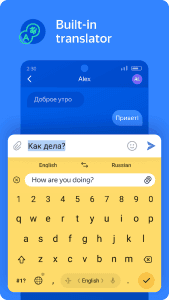
The integrated translation engine allows for seamless shifts between languages without ever needing to leave the chat window. This solution automatically detects the intended language and provides real-time conversions, making it an essential companion for international business or staying in touch with friends abroad. Instead of toggling between multiple apps, users can simply type their thoughts and watch as the text adapts to the recipient’s native tongue instantly.
Smart Predictive Typing
Harnessing the power of machine learning, this platform studies individual writing patterns to offer highly personalized word suggestions and corrections. While Yandex Keyboard focuses on efficiency, it remains respectful of user boundaries by providing a toggle to enable or disable the learning feature in the settings. This ensures that the more you interact with the interface, the more it anticipates your next move, effectively reducing the number of keystrokes required for daily tasks.
Expressive Visual Messaging
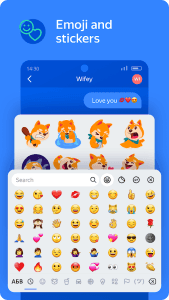
Communication is rarely just about words, and this utility understands the need for visual flair by supporting a vast library of GIFs, stickers, and emojis. Users can quickly search for the perfect reaction or use voice commands to insert specific emoticons directly into the conversation. This dynamic approach to messaging adds a layer of personality and fun to every interaction, making digital conversations feel more vibrant and engaging for everyone involved.
Fluid Gesture Navigation
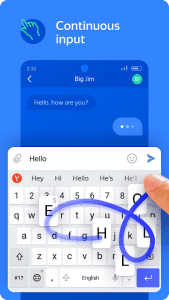
The smooth swiping functionality allows for rapid text entry by simply gliding a finger across the keys to form words and sentences. This gesture-based input method is particularly useful for one-handed use, providing a level of speed that traditional tapping often fails to match. By minimizing friction and maximizing responsiveness, the experience becomes second nature, allowing users to focus on the content of their messages rather than the mechanics of typing.
Robust Privacy Standards
Security and anonymity are core pillars of this service, ensuring that all input data is handled with the utmost care and never collected without explicit permission. All processed information is completely anonymized, protecting sensitive details from being linked back to an individual profile. This commitment to transparency gives users peace of mind, knowing that their private conversations and personal data remain secure while they enjoy the benefits of a modern, feature-rich input tool.
Customization and Style
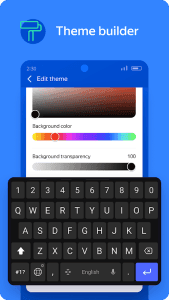
Personalizing the visual aspect of the interface is straightforward, with various themes and layouts available to suit different aesthetic preferences. Whether you prefer a minimalist look or something more colorful, Yandex Keyboard offers enough flexibility to match your device’s overall design language. Adjusting key heights and layout density further enhances ergonomics, ensuring that the typing surface feels comfortable for long-term use across a variety of screen sizes.
Frequently Asked Questions
Yes, this tool is completely free to download and use on Android devices, offering its full range of translation and predictive features without any hidden subscription costs.
Privacy is a top priority, and the service ensures all input is anonymized. It only collects data to improve suggestions if you specifically grant permission within the settings menu.
Absolutely! Yandex Keyboard supports advanced voice input that allows you to dictate text and even request specific stickers or emoticons using just your voice commands.
Yes, the experience features a highly responsive swiping mechanism that lets you compose messages by sliding your finger across the letters for faster and more intuitive input.
Additional APP Information
Package Name
ru.yandex.androidkeyboard
Developer
Яндекс
Category
Updated
Mar 19, 2026
Content Rating
Everyone
Signature
5d224274d9377c35da777ad934c65c8cca6e7a20
Get it On

You are now ready to download Yandex Keyboard for free. Here are some notes:
- Please read our APK Info and installation instructions carefully for the game & app to work properly
- Read the FAQ carefully for more details
4.7/5 (37 votes)